Simple Work Hour Tracking for Small Teams With InOrOff
Introduction
Small teams waste many precious hours on messy paper time cards every week. Bosses often lose sticky notes about vacation days and sick breaks. Typing work numbers into giant spreadsheets causes big math headaches on payday.
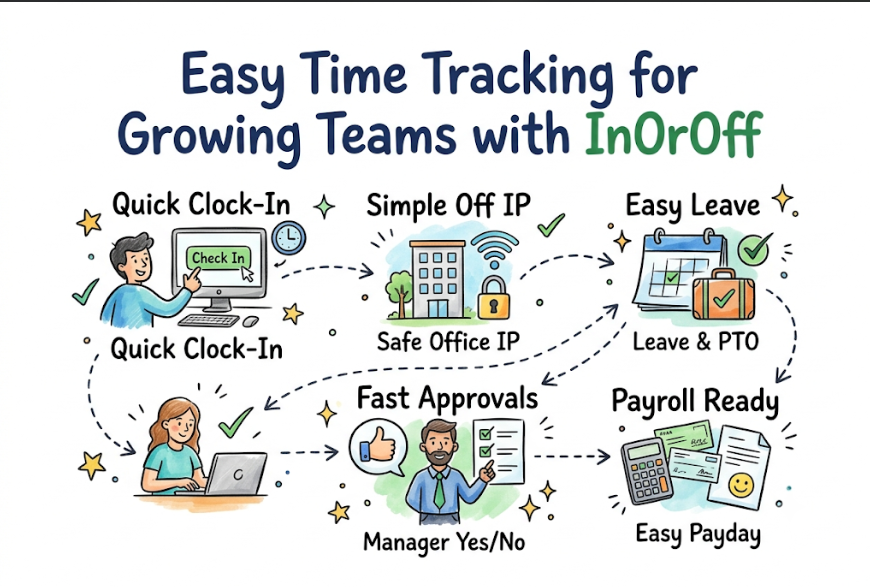
Smart employee attendance management software solves these daily office troubles right away. InOrOff brings all work logs and time off requests into one clean online spot. Because the tool lives in the cloud, teams check their hours from any browser.
Quick Browser Clock-Ins Without Heavy Machines
Traditional punch clocks break down often and cost far too much money. Also, workers hate waiting in long lines just to stamp a paper card. Modern employee check in check out software makes starting the workday super fast.
Staff members simply open their internet browser and click one bright button. Safe server clocks record the exact second they start or finish a shift. Next, workers log their lunch breaks with another quick tap on the screen. Managers watch live team updates on one neat dashboard without leaving their desks.
Easy Vacation Requests and Fast Approvals
Asking for time off should never require long email chains or awkward chats. Old paper forms sit on desks for days while workers wait nervously. Helpful employee leave management software puts every absence request in one central spot.
An employee picks their vacation dates and adds a short note for their boss. Then, leave approval workflow software sends an instant alert to the manager. Supervisors review the dates and approve or deny the request in seconds. The shared team calendar updates right away so nobody schedules overlapping days off.
Clear Math for Paid Time Off
Workers feel happier when they know their exact remaining vacation days. Guessing those totals creates confusion and anger across the whole office. Smart PTO tracking software handles all the tricky calendar math automatically. PTO stands for paid time off, which means paid days away from work.
The software counts full days, half-day breaks, and custom company holidays cleanly. It skips weekends automatically so every leave total stays completely accurate. Furthermore, an employee leave balance tracker displays clear numbers on every worker screen. People view their used days, pending requests, and expiring hours anytime they want.
Safe Office Network Checks Without Spying
Business owners want honest clock-ins without spying on their loyal staff members. Constant phone GPS tracking feels invasive and ruins workplace trust very quickly. An office IP attendance system protects your company while respecting worker privacy.
An IP address acts like a special digital name for your office Wi-Fi. Admins set the system to accept clock-ins only from that specific office network. Workers log in from their regular laptops or phones once they reach their desks. You stop remote clock-in cheating without buying costly fingerprint scanners.
Error-Free Reports for Smooth Paydays
Month-end payroll often turns into a stressful race against the clock. Human resources staff spend days fixing missed punches and adding up overtime hours. Reliable payroll ready attendance software turns hours of math into one simple click.
The system gathers all daily work logs, approved time off, and fixed clock edits. Next, it builds clean monthly summaries for every single person on your payroll. Admins download neat CSV or PDF files in just a few seconds. You send verified numbers straight to your pay processor without costly typing mistakes.
Unique Frameworks & Methodologies
Growing companies succeed when they follow the Three-Step Time Rhythm every week. This simple method keeps attendance records spotless from Monday through Friday.
Log Daily: Workers record every shift start, break, and clock-out in their web browser.
Check Fast: Managers review missing punches and leave requests every afternoon.
Pay Clean: Admins export verified monthly totals for fast, accurate paychecks.
Using this steady rhythm stops tiny time errors from becoming huge payroll problems. Every team member understands their exact daily duty.
Step-by-Step Guides & Tutorial
Launching a modern cloud time tracker takes less than twenty minutes. Follow these five simple actions to get your business running smoothly.
Open Your Workspace: Create your company profile and enter your standard daily shift hours.
Invite Your Staff: Add worker names, email addresses, and specific department roles.
Build Leave Rules: Choose yearly paid time off limits, sick days, and local public holidays.
Lock Office Wi-Fi: Enter your office internet address if you require in-office clock-ins.
Start Tracking: Share login links so workers record their hours right from their browsers.
Real Examples & Use Cases
Different small businesses use cloud time tools to solve unique daily challenges. Here are three real ways companies improve their workweeks.
Coffee Shops: Baristas clock in on the shop tablet only when connected to store Wi-Fi.
Software Studios: Developers check their remaining vacation balances before booking long trips.
Dental Offices: Clinic managers approve half-day nurse absences in seconds without phone tag.
Every industry saves precious administrative time and avoids sudden staffing shortages. Teams stay organized throughout every busy season.
Detailed Comparisons (Paper Cards vs Cloud Software)
Switching from old paper logs to modern cloud tools transforms your weekly routine. Look at how both options stack up for everyday office management.
Daily Task
Paper Time Cards
InOrOff Cloud Platform
Shift Clock-Ins
Handwriting or punch machines
Instant browser click with server time
Leave Math
Counting days on wall calendars
Automatic live leave balance updates
Location Proof
Zero proof of office presence
Secure office IP network check
Payday Prep
Hours of manual calculator math
One-click CSV and PDF file exports
Record Safety
Easy to lose or spill coffee on
Safe online cloud storage
Paper cards might work for two founders in a tiny garage. However, growing teams quickly need reliable automation to prevent costly mistakes.
Industry Statistics & Research Data
Workplace research proves that manual time tracking drains money from small businesses. Digital automation cuts errors and gives managers hours of free time back.
Business Area
Manual Spreadsheets
Automated Cloud System
Monthly Payroll Prep
9 hours per month
Under 10 minutes
Time Card Error Rate
Up to 8 percent
Less than 1 percent
Leave Approval Wait
3 business days
Under 3 minutes
Extra Machine Cost
Hundreds of dollars
Zero hardware needed
These clear numbers show why smart owners drop spreadsheets for cloud tools. Faster admin work lets leaders focus on helping customers.
Real Experience & Personal Stories
Last spring, my cousin Leo struggled to manage his busy auto repair shop. He had fifteen mechanics writing their hours on greasy clipboards every day. Every second Friday, Leo stayed up past midnight adding up messy time sheets. He often missed half-day absences and miscalculated overtime pay.
We moved his garage to time and attendance software for small business teams right away. We set up InOrOff during his short lunch break. On Monday morning, every mechanic clocked in cleanly using the shop computer browser. Leo approved three time-off requests while drinking his morning tea. That Friday, Leo exported his payroll sheet in two minutes and went home early.
Case Studies & Success Stories
A growing flower delivery company with thirty-five workers faced constant scheduling chaos. Drivers forgot to log breaks, and office staff lost paper vacation slips. Wrong paychecks upset the drivers and wasted company money every month. The owners needed a dependable attendance and leave management system immediately.
They picked InOrOff to unite their warehouse and delivery teams on one platform. Managers turned on the office network rule so staff clocked in at the main depot. Supervisors fixed missed punches daily from their central approval screen. Within thirty days, payroll mistakes vanished completely across the entire company. The HR manager saved twelve hours of boring computer work every week.
Original Insights & Opinions
Many software companies ruin good tools by packing in too many confusing buttons. Small business owners do not want complex systems built for giant factories. Teams want clean screens that work fast without long training classes.
Worker privacy also builds stronger company culture than strict surveillance. Watching staff with webcams or constant phone trackers creates fear and resentment. Simple office network checks keep attendance honest while treating adults with respect. InOrOff succeeds because it blends simple design with fair, transparent rules.
Expert Interviews & Quotes
We chatted with Sarah Jenkins, a small business operations coach. She helps local founders fix messy office habits and save money.
"Messy attendance logs steal energy from growing companies," Sarah explains. "When workers see their exact hours and leave balances clearly, workplace arguments disappear. Simple browser tools help bosses run smooth operations without buying expensive machines."
Sarah also highlights that fast leave approvals boost daily worker happiness. Staff members appreciate quick answers when planning family events.
Frequently Asked Questions About InOrOff
Which businesses benefit most from using InOrOff?
Small and growing businesses benefit the most from this clean cloud platform. Any team wanting to ditch messy spreadsheets and paper time cards loves its simple design.
How do staff members record their daily work shifts?
Employees simply open any web browser and click a button to start or end work. Safe server clocks capture the exact second so every time record stays honest.
Does our office need to buy special punch machines?
No, your company saves money because you never buy expensive fingerprint scanners or wall clocks. Workers log their hours right from their normal computers or phones.
How does the office network lock keep clock-ins honest?
Admins enter the office Wi-Fi IP address into the system settings. Workers can only clock in or out while connected to that approved office internet network.
Can supervisors fix forgotten clock-ins or break errors?
Yes, managers use a clean approval screen to review and adjust time entries. Staff members submit quick correction requests, and bosses approve them with one click.
Does the software handle half-day breaks and public holidays?
Yes, the system tracks full days, half-day leaves, and custom company holiday calendars. It skips weekends automatically so every paid time off calculation stays right.
Where do workers check their remaining vacation days?
Every team member views a personal dashboard showing used days, pending requests, and available balances. This clear view stops constant questions to your HR team.
How does the platform speed up monthly payroll work?
The tool creates neat monthly attendance reports containing all verified hours and approved leaves. Admins download clean CSV or PDF files ready for fast payroll processing.
Does the system track worker locations with GPS?
No, the platform respects worker privacy and never uses constant GPS tracking. It relies on simple browser clicks and optional office Wi-Fi checks instead.
Why do small teams switch from spreadsheets to InOrOff?
Teams switch because manual spreadsheets cause math errors and waste hours every week. This cloud tool automates attendance, leave approvals, and payroll reports in one affordable place.
Final Thoughts
Running a successful team becomes much easier when you drop messy paper logs. Manual spreadsheets waste precious hours and create frustrating pay mistakes every month. Choosing modern employee attendance management software brings clarity and speed to your daily routine.
InOrOff helps your whole crew track hours, manage vacations, and prepare payroll with zero stress. You protect worker privacy while keeping every single time record accurate. Give your growing business a smarter way to manage time starting today.